
Awesome Golf Simulator
Great DetailSports
4.073.00 Reviews
- Version
- 3.10.3
- Installs
- 50.00K
- Age Rating
- Everyone
Screenshots


Our Review of Awesome Golf Simulator
 Analysis by Appyee
For me, the most useful way to judge a golf simulator is not just by how convincing a shot looks, but by whether I can understand what it is asking me to do and use it comfortably in the setting I actually have. Awesome Golf Simulator is a sports app from Great Detail, and its focus is swing and shot tracking. That makes it interesting to golfers who want feedback as well as people curious about practicing at home, though the experience depends on having the right setup and on how much detail you personally find easy to process.
Making sense of the screen and the feedback
When I try a swing-tracking app, I want to know where to begin, what the app has captured, and how to interpret the result without hunting through menus. The original interface feels approachable, and that matters for someone opening a golf tool between other daily tasks rather than settling in for a long tutorial. Clear navigation can lower the barrier for a newer player who knows the basics of a club but has never studied shot metrics.
The most useful habit is to change one thing at a time. If I am working on a short session, I would choose a single goal—such as making a repeatable swing—and compare a few attempts rather than trying to correct posture, tempo, direction, and distance all at once. That approach makes any feedback easier to act on, and it avoids treating one unusual shot as proof that a whole technique is wrong.
There is a trade-off here: tracking is only helpful when I can connect a result to a physical adjustment. A number or visual reading may point toward a pattern, but it does not automatically explain why that pattern happened. I would use the app as a prompt for focused practice, not as a replacement for a coach who can observe body position and ask questions. If detailed feedback feels busy or discouraging, keeping sessions short and concentrating on one observation at a time is a sensible way to make it more manageable.
Different bodies, senses, and practice styles
Golf practice is not identical for everyone. Some players prefer visual feedback, others learn better by listening or repeating a movement, and some need to take breaks or adapt how they hold and swing a club. I would not assume that a simulator automatically suits every physical or sensory need. Instead, I would treat the app as one possible source of practice feedback and see whether its tracking fits the way I can comfortably move and focus.
For a player who is sensitive to sound, the immersive audio may be less valuable than the shot information; keeping the device volume low or muted, if the device controls allow it, can make practice calmer. Someone who finds fast-moving visuals tiring may prefer to pause between attempts and review the result before swinging again. These are simple adjustments rather than special app features, but they can make a session easier to sustain.
Physical comfort deserves the same attention. A full golf swing needs room, and a virtual setting does not remove the need to move safely. I would clear the area, avoid swinging close to furniture or other people, and stop if a repeated motion becomes uncomfortable. Players with limited range of movement may still find value in observing shot patterns or practicing within their comfortable motion, but they should not feel obliged to reproduce a full swing just because a simulator is involved.
Where it fits into an ordinary day
A realistic use case is a golfer with a short gap before dinner who wants to work on a specific part of their game instead of driving to a course or practice facility. I would decide on one small target first, set up the space, take a few swings, and then stop to review what changed. The benefit is not that a quick home session can reproduce every condition outdoors; it is that a repeatable routine can help me notice tendencies without turning practice into a major outing.
This is also where the app differs from the usual alternatives. A basic golf game is mainly about entertainment and may reward a good result without teaching much about the movement behind it. A video of a professional swing can offer ideas, but it cannot respond to my own shots. A lesson with a human coach can provide direct observation and tailored corrections, while a course or driving range gives real-world conditions that a home setup cannot duplicate. I see swing tracking as a middle ground: more personal than watching a video, but not a substitute for instruction or outdoor play.
For a beginner, the best starting point is a modest expectation. The app can make practice feel more structured, but it cannot guarantee that a particular reading will translate into lower scores on a course. For an experienced golfer, the appeal is the chance to review repeated swings and look for consistency. In either case, it is worth comparing feedback across several attempts and avoiding big technique changes based on one session.
The app is less suitable for someone who wants a fully guided coaching plan, does not have a safe place to swing, or expects an exact replica of playing outdoors. It may also be a poor fit for a person who dislikes looking at performance feedback or would rather spend practice time with a coach or on a real range. I would make that decision based on the kind of practice I enjoy, not simply on the promise of tracking.
The First Tee: Getting Started
Getting started with Awesome Golf Simulator is as smooth as sinking a hole-in-one. The download and installation process is straightforward, and before you know it, you’re on the virtual greens. The app is available on both Android and iOS, so you’re covered no matter your device preference.
Once installed, you’re greeted with a user-friendly interface that’s intuitive and easy to navigate. It’s like having your personal caddy guiding you through the setup. The graphics are crisp, and the design is sleek, making it a pleasant experience right from the get-go.
As a practical matter, I would check that the device I plan to use can run the app before making it part of a regular routine. It is free to download, rated for Everyone, and has an average rating of 4.0 from 217 ratings, with 50K+ installs. The release date is Mar 9, 2022, and the current version is 3.9.4, with Android 8.0 as the minimum OS. Those details make it easier to judge basic compatibility, but they do not tell me whether my room, movement, or preferred way of learning will suit the experience.
The in-app purchase range is $9.99 to $349.99 per item, so I would take a moment to understand what is included before spending anything. A free starting point is useful, but the range means it is better not to assume that every part of a longer-term setup will be free. I would first decide what I need from the app, try the available experience, and only consider a purchase if it addresses a clear practice goal.
Features That Stand Out
This simulator is packed with features that cater to both beginners and seasoned golfers. One of the standout features is the realistic physics engine. The app does a great job of replicating the actual feel of playing golf. From the swing mechanics to the ball trajectory, everything feels quite authentic.
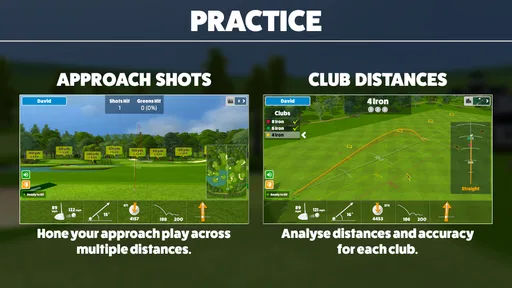
The app offers a variety of courses, which I found to be both challenging and engaging. Whether you’re teeing off at a coastal course or tackling a desert landscape, the variety keeps things interesting. There’s also a practice mode where you can work on specific aspects of your game, like driving or putting.
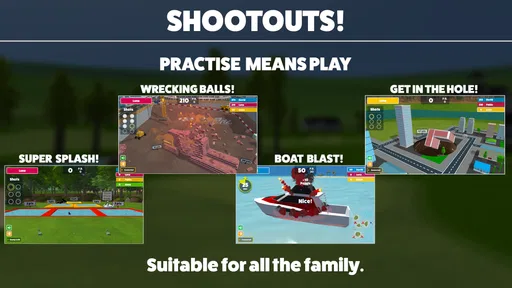
Another cool feature is the multiplayer option. You can compete with friends or other players around the globe. It’s like having a global golf tournament at your fingertips. I found this particularly exciting as it adds a competitive edge to the game.
Those options suit different moods, but I would keep entertainment and deliberate practice separate. When I want to improve a movement, a focused practice session is more useful than jumping between courses or competition. When I simply want a casual round, the variety and multiplayer element can make the app feel less like a training task. That distinction helps me choose the mode that matches my energy rather than expecting every session to deliver the same kind of value.
On the Green: Gameplay Experience
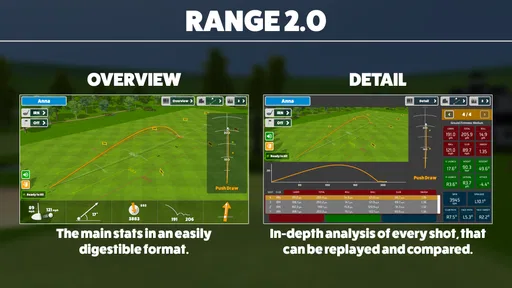
When it comes to gameplay, Awesome Golf Simulator doesn’t disappoint. The controls are responsive, and the app’s ability to capture the nuances of a golf swing is impressive. It even takes into account the speed and angle of your swing, providing a comprehensive analysis of your shots.
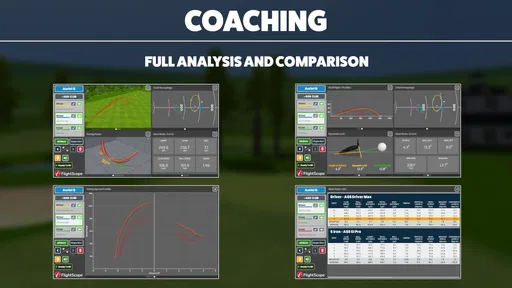
The app also includes a feature that tracks your progress over time. It’s like having a virtual coach that helps you improve your game. I found this feature incredibly helpful as it gave me insights into my strengths and areas that needed improvement.
To get more from that tracking, I would compare like with like: practice the same type of shot under similar conditions, and note whether a change in technique produces a steadier pattern. Mixing a new grip, a different club, and a different target in one session makes it hard to tell what caused a change. This is a small workflow choice, but it turns a collection of attempts into something more useful. I would also end a session when concentration fades; tired swings can muddy the picture instead of adding meaningful practice.
One thing that stood out to me was the app’s attention to detail. From the sound of the club hitting the ball to the wind rustling through the trees, the immersive experience makes you feel like you're actually on the course.
That atmosphere is enjoyable, but it is not the same as being outdoors. A real course asks me to adapt to lies, weather, uneven ground, and the pace of other players. A simulator can make practice more convenient and repeatable, while those real conditions remain a reason to keep playing outside when possible. I would use the virtual experience to support a golfing routine, not to judge whether I am ready for every course situation.
Final Thoughts: Is It Worth the Download?
In my opinion, Awesome Golf Simulator is a must-try for anyone with an interest in golf, whether you’re a pro or just starting out. The combination of realistic gameplay, variety of courses, and social features makes it a compelling choice.
Overall, the app is a fantastic way to enjoy golf without having to leave your home. It’s perfect for practice, competition, or just a casual game. So, if you're looking to enhance your golfing skills or simply have fun, give Awesome Golf Simulator a shot. You might just find yourself hooked on this virtual fairway adventure.
My recommendation is strongest for people who enjoy experimenting with their swing and want an indoor activity that can alternate between practice and play. I would be more cautious if you need personalized instruction, have no safe swinging space, or find performance feedback stressful rather than motivating. The app works best when I treat its tracking as one useful perspective, stay realistic about what a home simulator can teach, and choose a pace and setup that feel comfortable for me.
Verdict
Strengths of Awesome Golf Simulator
- Realistic graphics enhance gameplay immersion.
- Wide variety of courses to choose from.
- Customizable settings for personalized experience.
- Multiplayer mode for competitive play.
- Regular updates with new features and courses.
Limitations of Awesome Golf Simulator
- High battery consumption during play.
- Requires stable internet for optimal performance.
- Limited free content; in-app purchases needed.
- May lag on older devices.
- Large download size requires ample storage.
Similar Picks in This Category
View All
BeSoccer: Soccer Live Score
BeSoccer apps4.3

Cricbuzz - Live Cricket Scores
Cricbuzz.com3.7

NFL
NFL Enterprises LLC2.4

Da Fit
MO YOUNG LIMITED3.6

ESPN
Disney4.5

LiveScore: Live Sports Scores
LiveScore Limited4.5
Frequently Asked Questions
What devices are compatible with Awesome Golf Simulator?
Awesome Golf Simulator is compatible with a wide range of devices. It runs smoothly on most Android and iOS devices, including smartphones and tablets. Ensure your device is updated to the latest operating system to avoid any compatibility issues. Additionally, a stable internet connection is recommended for the best experience.
Does Awesome Golf Simulator offer multiplayer support?
Yes, Awesome Golf Simulator offers multiplayer support, allowing you to compete with friends or other players online. You can join or create tournaments, participate in challenges, and track your progress on leaderboards. This feature enhances the social aspect of the game, making it more engaging and competitive.
Are there in-app purchases in Awesome Golf Simulator?
Awesome Golf Simulator offers in-app purchases that enhance the gaming experience. These purchases can include premium clubs, exclusive courses, and customization options. While the game is free to download, these optional purchases can provide additional content and features for players looking to expand their gameplay.
What are the system requirements for Awesome Golf Simulator?
To run Awesome Golf Simulator effectively, your device should have at least 2GB of RAM and a quad-core processor. This ensures smooth gameplay and optimal performance. Additionally, ensure that you have sufficient storage space available as the app requires a decent amount of memory for installation.
How often is Awesome Golf Simulator updated?
Awesome Golf Simulator is regularly updated to improve performance, fix bugs, and introduce new features or courses. Updates are typically released every few months, ensuring that the app remains fresh and engaging. It’s recommended to keep the app updated to enjoy the latest improvements and content.
